

Introducing the ASP Service Desk
By Neeru Panjwani, Director of Human Resources
ASP is proud to introduce the ASP Service Desk – one place for every workplace question. In last year’s Employee Engagement Survey, you told us something we needed to hear. You:
- Wanted a faster response to your emails and voice messages.
- It was not always clear who to contact
- There was no way to know if your message has been received
We took that feedback seriously and built the online service desk. Don’t forget to bookmark it!
What is the ASP Service Desk?
Think of it as your single front door to HR, Resource Planning, Payroll & Accounting, and Operations. Instead of figuring out who to email — or emailing three people and hoping one responds — you submit your request or question online. Best of all:
- No account needed.
- No forms to print.
- Works on any device, including your phone.
Whether it’s a question about your pay stub, a request for an employment letter, a schedule dispute, or a reimbursement claim — it goes through ASP Service Desk.
Who Can You Reach?
ASP Service Desk covers the four departments you interact with most: HR, Resource Planning, Payroll & Accounting, Operations.
What’s Different this Time?
The Service Desk has been designed with accountability built in from the start:
- Every request or question gets a Ticket ID the moment you submit — proof it was received.
- Defined timelines. Every submission type has a response deadline based on preset categories.
- Automatic escalation. If a deadline is missed, the system automatically escalates your submission to a senior team member — you don’t have to chase anyone.
- Coming soon. A feedback and rating feature will be introduced in a future upgrade so you can share your experience directly with the HR team.
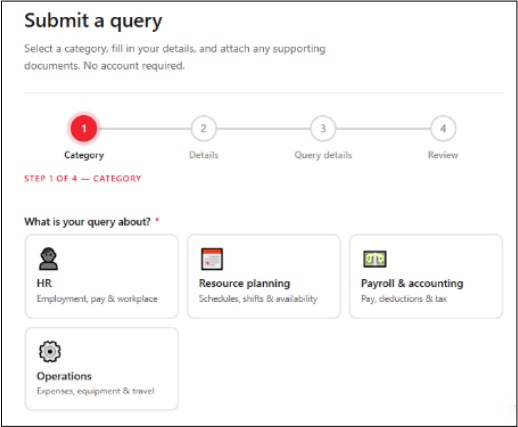
How it Works — in 4 Steps
- Choose your category, describe your query, attach any files.
- Receive a Ticket ID by email from no-reply.asp-servicedesk@security-asp.com.
- The right department picks it up and responds within the committed timeframe.
- Coming in a future upgrade — you will be able to rate your experience directly after closure.
One Tip That Makes a Real Difference
The fastest way to get a response is to include all the relevant details upfront — dates, amounts, your employee ID, and any supporting documents. Submissions with complete information are resolved faster, often in a single response. Incomplete submissions get put on hold while we follow up, which delays everything.
Rollout — Starting with our Airport Sites
Phase 1 — Toronto Pearson & Billy Bishop Airports
ASP Service Desk is launching in phases. Phase 1 covers Toronto Pearson (YYZ) and Billy Bishop Airport (YTZ). As we expand to additional sites and groups, each team will receive a direct email notification when it goes live for them.
If you haven’t received that email yet — it’s coming. In the meantime, this article gives you everything you need to know so you’re ready when it does.
Ready to try it?
ASP Service Desk is live now. You can access it on any device — desktop, tablet, or phone.
Access ASP Service Desk
On desktop or laptop: servicedesk.security-asp.com
On your phone: Scan the QR code above with your phone camera to open ASP Service Desk directly — no typing required.

A note from HR
We believe that a structured, accountable process for responding to your questions and requests will result in faster turnaround times. We’ll be tracking response times, closure rates, and your satisfaction scores from day one. If something isn’t working the way it should, we want to know. Reach out to us directly at asphr@security-asp.com.
Thank you, as always, for everything you bring to ASP every day.